Learn World Maps
Learn where countries are, region by region. Each lesson highlights the countries on the map so you can study their borders, neighbors, and geography - then test yourself.
Explore
 Interactive
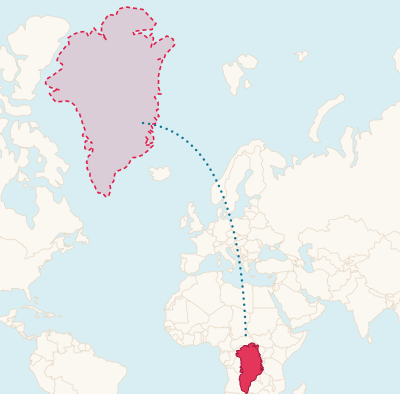
 The true size of countries
Drag Greenland, Russia or any country across the map and watch it shrink or grow to its real size. Most world maps get this badly wrong.
- 14× Africa is this much bigger than Greenland
- ×4 how much the map inflates areas at 60° north
Map tools
Americas
Central America Map
Locate Belize, Costa Rica, El Salvador, Guatemala, Honduras, Nicaragua, and Panama on the map.
North America Map
Study the locations of Canada, Mexico, and the United States.
South America Map
Learn where all 12 South American countries are located and who their neighbors are.
Caribbean Map
Identify thirteen Caribbean island nations on the map.
Europe
Europe Map
Master the locations of all 44 European countries from Iceland to Russia.
Nordic Countries Map
Locate Denmark, Finland, Iceland, Norway, and Sweden in northern Europe.
Baltic States Map
Find Estonia, Latvia, and Lithuania on the eastern Baltic coast.
Benelux Map
Locate Belgium, Netherlands, and Luxembourg in western Europe.
Caucasus Map
Find Armenia, Azerbaijan, and Georgia between the Black and Caspian seas.
Central Europe Map
Locate Czechia, Hungary, Poland, and Slovakia in the heart of Europe.
Asia
Asia Map
Study the locations of all Asian countries from Turkey to Japan.
Middle East Map
Study the locations of Middle Eastern countries from Turkey to Yemen.
Central Asia Map
Locate Kazakhstan, Kyrgyzstan, Tajikistan, Turkmenistan, and Uzbekistan.
Southeast Asia Map
Find mainland and maritime ASEAN countries from Myanmar to Timor-Leste.
Africa
Africa Map
Study the locations of all 54 African nations.
North Africa Map
Locate six North African countries along the Mediterranean and Sahara.
West Africa Map
Find sixteen West African countries from Nigeria to Senegal.
Central Africa Map
Locate nine Central African nations including both Congos and Cameroon.
East Africa Map
Study eighteen East African countries from Ethiopia to Mozambique.
Southern Africa Map
Locate Botswana, Eswatini, Lesotho, Namibia, and South Africa.
Oceania
How Map Lessons Work
Choose a Region
Browse lessons by continent. Each lesson loads an interactive map of the region.
Explore the Map
Countries in the lesson are highlighted on the map. Click any country to jump to its study card with borders, neighbors, and geographic facts.
Take the Quiz
Test yourself - identify highlighted countries on the map and answer questions about borders and geography.
Why Study Maps with GeoFunGames?
Knowing where countries are located is the foundation of geographic literacy. Our interactive map lessons let you visually explore each region - clicking countries, learning borders, and building spatial memory through active engagement rather than passive reading.
What You'll Learn
- Locate countries on a map by region
- Learn which countries share borders (neighbors)
- Understand geographic features: coastlines, mountains, rivers
- Recognize country shapes and spatial relationships
- Build map literacy through hands-on, interactive exploration
Lesson Features
- Interactive maps - click countries to learn about them
- Countries highlighted as you scroll through study cards
- Border and neighbor data for every country
- Shape hints to help you recognize outlines
- Quiz with map-based questions (identify highlighted countries)
For Students, Travelers, and Geography Enthusiasts
Whether preparing for a geography exam, planning travel routes, or simply curious about the world, these interactive lessons help you build a mental map. Start with small regions (Nordic, Baltic, Benelux, Melanesia) then tackle entire continents.
Pick a Region and Start Exploring
Each lesson features an interactive map. Click, explore, and learn.
Frequently Asked Questions
How do the interactive maps work?
Each lesson loads an interactive map of the region. Countries in the lesson are highlighted in blue. Click any highlighted country to jump to its study card, or scroll through cards to see countries light up on the map.
Do I need to install anything?
No. The maps work in any modern browser - desktop or mobile. No plugins or downloads required.
How is the quiz different from the Maps game?
The learn quiz is untimed and low-pressure - designed for study, not competition. The Maps game has timers, levels, and leaderboards for when you want a challenge.
Can I use these on mobile?
Yes! The maps are fully responsive. On mobile you can tap countries and scroll through study cards normally.